2024 Small Business Planner for Canva
Running a small business in 2024 means balancing creativity with consistency—launching products while tracking margins, building an audience while refining your brand voice, and planning seasonal campaigns without losing sight of long-term goals. The 2024 Small Business Planner for Canva meets that reality head-on: it’s not just another calendar or to-do list. It’s a unified, editable system built for how modern entrepreneurs actually work—across devices, roles, and growth stages.
Why a Canva-Based Planner Makes Sense Now
More small business owners are shifting away from fragmented tools—spreadsheets for finances, sticky notes for ideas, separate apps for social scheduling—and toward all-in-one visual workspaces. Canva’s intuitive drag-and-drop interface, real-time collaboration features, and seamless export options (PDF, JPG, PNG) align perfectly with today’s need for flexibility without friction. Unlike rigid printed planners or complex project management software, the 2024 Small Business Planner Canva KDP Interiors version gives you full design control while maintaining professional structure. You’re not locked into someone else’s layout—you adjust colors, fonts, sections, and even page order to match your brand identity or workflow rhythm.
This shift reflects broader habits: remote and hybrid work environments demand portability; solopreneurs juggle multiple hats and need clarity—not clutter; and visual thinkers benefit from seeing financials beside marketing timelines or inventory next to launch checklists. A planner that lives in Canva supports that spatial, cross-functional thinking.
What’s Inside—and Why Each Section Fits Real Work
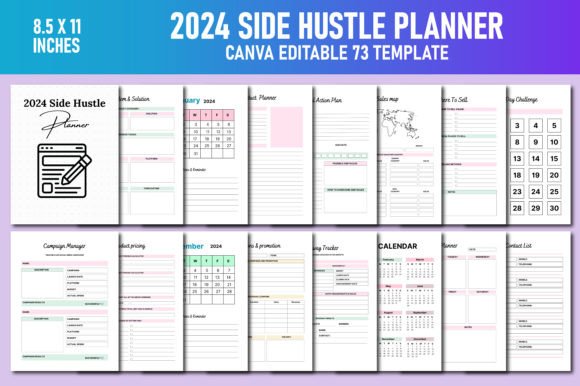
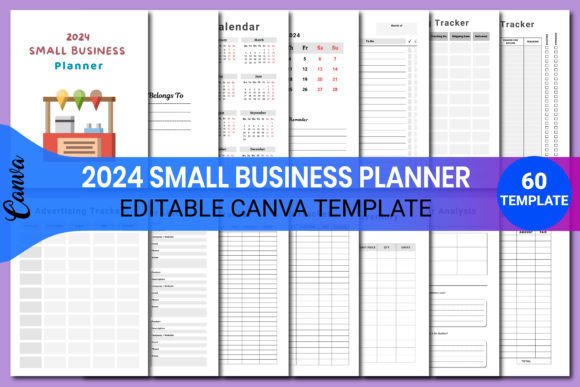
The planner includes over 30 purpose-built pages, each designed around recurring operational needs—not theoretical ideals. For example:
- Budget Tracker + Expense Tracker + Tax Deduction Log: These aren’t isolated spreadsheets. They’re visually aligned so you can see monthly spending trends alongside upcoming bill due dates and potential deductions—all editable in one place. No more toggling between tabs or reformatting numbers.
- Social Media Planner + Campaign Manager + Seasonal Promotions: Rather than guessing what to post when, this trio connects content themes to campaign goals and seasonal timing. You can map a holiday collection launch across Instagram posts, email sequences, and inventory prep—all on adjacent pages you customize together.
- Product Inventory + Sales Tracker + Monthly Sales: Track stock levels, monitor velocity, and compare performance month-to-month—without switching platforms. Because these sheets share consistent naming conventions and date formatting, spotting patterns (e.g., slower-moving items during Q2) becomes intuitive, not investigative.
- Branding Kit + Target Customer Market + Website Planner: Visual identity, audience insight, and digital presence are treated as interdependent—not siloed tasks. You update your brand palette once, then apply it across customer personas and site wireframes, reinforcing cohesion across touchpoints.
Even practical details reflect current expectations: the Customer Receipt and Order Form pages use clean, mobile-friendly layouts suitable for printing or sharing digitally. The Launch Your Shop section walks through pre-launch steps—not just “set up Shopify,” but “define return policy language,” “test checkout flow,” and “schedule first three email sequences.” It assumes you’re doing this yourself, possibly for the first time.
Designed for Real-World Customization—Not Just Decoration
“100% customizable” isn’t marketing speak here—it’s structural. Every text box is editable. Every color swatch is adjustable. Icons, dividers, and headers follow Canva’s native layering logic, so swapping assets takes seconds, not hours. That matters because customization isn’t about aesthetics alone. It’s about relevance: renaming “Product Analysis” to “Course Enrollment Review” for educators, changing “Seasonal Promotions” to “Workshop Series Calendar” for coaches, or adapting “Competitor Analysis” to compare service packages instead of physical goods.
The 2024 Small Business Planner Canva KDP Interiors variant adds interior-specific refinements—like space planning grids, mood board placeholders, and vendor contact fields optimized for contractors, stylists, and home-based designers. But the core philosophy remains the same: start with proven frameworks, then tailor them to your context—not the other way around.
Print-Ready, Yet Fully Digital—No Compromise Needed
You get high-quality print-ready files (PDF, JPG, PNG), meaning you can bind a physical copy for desk use, laminate key pages for workshop settings, or print weekly to-do lists for team huddles. At the same time, the editable Canva template ensures you’re never stuck updating static documents. Add new clients to your Contact List, adjust pricing in your Price List, or revise your Goal Action Plan mid-quarter—all without recreating anything from scratch.
This dual format responds to evolving preferences: some entrepreneurs thrive with pen-and-paper reflection; others rely on cloud access across devices. The planner bridges both. You’re not choosing between analog focus and digital scalability—you’re using whichever serves the moment.
Time Saved Is Energy Redirected
Small business owners consistently cite time management as their top challenge—not lack of ideas or effort. Building custom trackers, formatting reports, designing client-facing forms, and reorganizing calendars eat into hours better spent creating, connecting, or improving offerings. With the 2024 Small Business Planner for Canva, those recurring setup tasks vanish. Instead of troubleshooting Excel formulas or hunting for matching fonts, you’re refining messaging, testing offers, or analyzing feedback from your Customer Feedback page.
Consider a freelance graphic designer preparing for Q1 client onboarding. In under 15 minutes, they can: personalize the Branding Kit with their logo and tone guidelines; populate the Project Planner with deadlines and milestones; draft a Website Planner outline for their portfolio refresh; and export a clean PDF for their first discovery call. That’s not automation—it’s intentionality, enabled by thoughtful design.
Not a Shortcut—A Foundation
This planner won’t replace strategy, market research, or relationship-building. What it does offer is scaffolding: a consistent structure that reduces cognitive load and surfaces connections you might otherwise miss. When your Marketing Plan sits beside your Target Customer Market and Sales Tracker, assumptions get tested faster. When your Annual Profit Loss links visually to your Monthly Sales and Expense Tracker, financial health becomes tangible—not abstract.
It also grows with you. Start with just the Weekly To Do List, Budget Tracker, and Meeting Notes. As capacity expands, layer in Competitor Analysis, Long Term Business Goals, or Inventory Tracking. There’s no pressure to use everything at once—just the option to reach for what’s needed, when it’s needed.
Who Benefits Most—And How
Freelancers launching their first website find immediate value in the Website Planner and Launch Your Shop pages. Etsy sellers use Product Inventory, Order Tracker, and Seasonal Promotions to coordinate handmade batch production with holiday demand. Coaches and consultants lean on Meeting Notes, Client Feedback, and Goal Action Plan to document progress and refine service delivery. Educators building online courses adapt the Collection Ideas and Marketing Plan pages for curriculum rollout.
Even hobbyists turning passion into side income benefit—not from scaling fast, but from building habits: tracking time spent on prototypes (Project Planner), pricing experiments (Price List), or early sales data (Sales Tracker). The planner normalizes measurement without demanding perfection.
Ultimately, the 2024 Small Business Planner for Canva works because it mirrors how people operate—not how productivity gurus say they should. It respects complexity while reducing noise. It supports discipline without sacrificing adaptability. And it puts control—not constraints—back in your hands.